OOP Design Patterns in R: Factory, Strategy & Observer in R6
Design patterns are reusable solutions to recurring object-oriented problems. R6's mutable reference classes make the classic Gang-of-Four patterns, Factory, Strategy, Observer, Singleton and Builder, natural, compact and genuinely useful inside R packages, Shiny apps and simulation code.
By Selva Prabhakaran · March 2026
How does the Factory Pattern work in R6?
A factory is a function whose only job is to decide which class to build and hand you back an instance you can use without caring about the choice it made. It keeps the selection rule in one place and lets the rest of your code treat the result uniformly. The classic R use case: a single read() method that silently routes CSV, JSON and Excel files to the right reader.
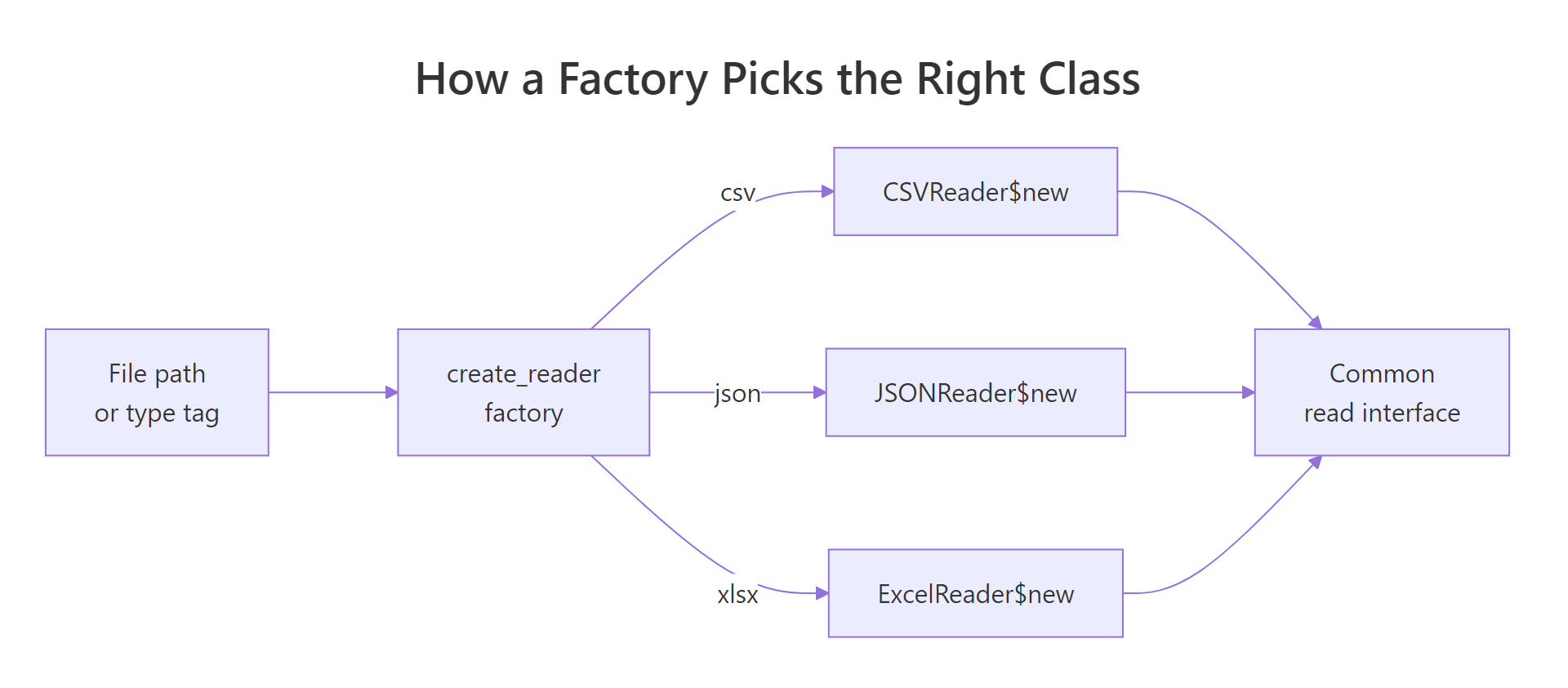
Below we define three reader classes that share a read() method, then a tiny create_reader() factory that picks one based on the file extension. The caller never mentions CSVReader or JSONReader by name.
Two different classes, one line of calling code. Adding an ParquetReader tomorrow means adding one R6Class and one line in the switch, no caller touches change.
Figure 1: How a factory routes one call to the right reader class.
Key Insight
Callers depend on the interface, not the concrete class. Every reader exposes $read(), so the calling code is immune to which subclass the factory picked. That is the whole point of the pattern.
Try it: Add an RDSReader to the factory that handles .rds files. It should return list(kind = "rds") from its read() method.
RExercise: add exRDSReader
ex_RDSReader <-R6Class("ex_RDSReader", public =list( read =function(path) {# your code here } ))ex_create_reader <-function(path) { ext <-tolower(tools::file_ext(path))switch(ext,"csv"= CSVReader$new(),"rds"=NULL, # your code herestop("Unsupported: ", ext) )}ex_create_reader("model.rds")$read("model.rds")#> Expected: $kind [1] "rds"
Explanation: The factory only needs the new mapping; every other caller still writes create_reader(path)$read(path).
How does the Strategy Pattern swap behavior at runtime?
Strategy splits what from how. A context object knows what job needs doing, computing a single score from a vector of numbers, and holds onto a strategy object that knows how to do it. Swap the strategy and the same context behaves differently, without a single if/else.
We'll build three scoring strategies (mean, median, trimmed mean) and a Scorer context that delegates to whichever strategy it currently holds. The important move is that the caller can change strategies midway through a session.
RStrategy pattern with Scorer
MeanScore <-R6Class("MeanScore", public =list(score =function(x) mean(x)))MedianScore <-R6Class("MedianScore", public =list(score =function(x) median(x)))TrimmedScore <-R6Class("TrimmedScore", public =list( trim =NULL, initialize =function(trim =0.1) self$trim <- trim, score =function(x) mean(x, trim = self$trim) ))Scorer <-R6Class("Scorer", public =list( strategy =NULL, initialize =function(strategy) self$strategy <- strategy, set_strategy =function(strategy) self$strategy <- strategy, run =function(x) self$strategy$score(x) ))sc <- Scorer$new(MeanScore$new())sc$run(c(1, 2, 3, 4, 100))#> [1] 22sc$set_strategy(MedianScore$new())sc$run(c(1, 2, 3, 4, 100))#> [1] 3sc$set_strategy(TrimmedScore$new(trim =0.2))sc$run(c(1, 2, 3, 4, 100))#> [1] 3
The single outlier (100) drags the plain mean to 22, but both the median and the 20%-trimmed mean ignore it and report 3. Same sc$run() call, three completely different robust-statistics behaviors, decided by which strategy object is attached.
Tip
Strategies can be plain functions when they carry no state. If TrimmedScore didn't need to remember trim, you could skip the R6 wrapper entirely and pass mean, median or function(x) mean(x, trim = 0.2) directly. Reach for R6 only when the strategy itself needs fields.
Try it: Write ex_MaxStrategy, an R6 class whose score() method returns max(x), and plug it into Scorer (already defined above).
RExercise: MaxStrategy class
ex_MaxStrategy <-R6Class("ex_MaxStrategy", public =list( score =function(x) {# your code here } ))ex_sc <- Scorer$new(ex_MaxStrategy$new())ex_sc$run(c(3, 1, 9, 4))#> Expected: 9
Explanation: The context doesn't care how score() is computed, it only calls self$strategy$score(x). Any object that implements score() plugs in cleanly.
How does the Observer Pattern notify listeners of state changes?
Observer inverts the usual call direction. Instead of code polling an object ("did anything change yet?"), the object itself calls a list of subscribers whenever its state updates. Shiny's reactivity is built on this idea; so is every event bus you have ever used.
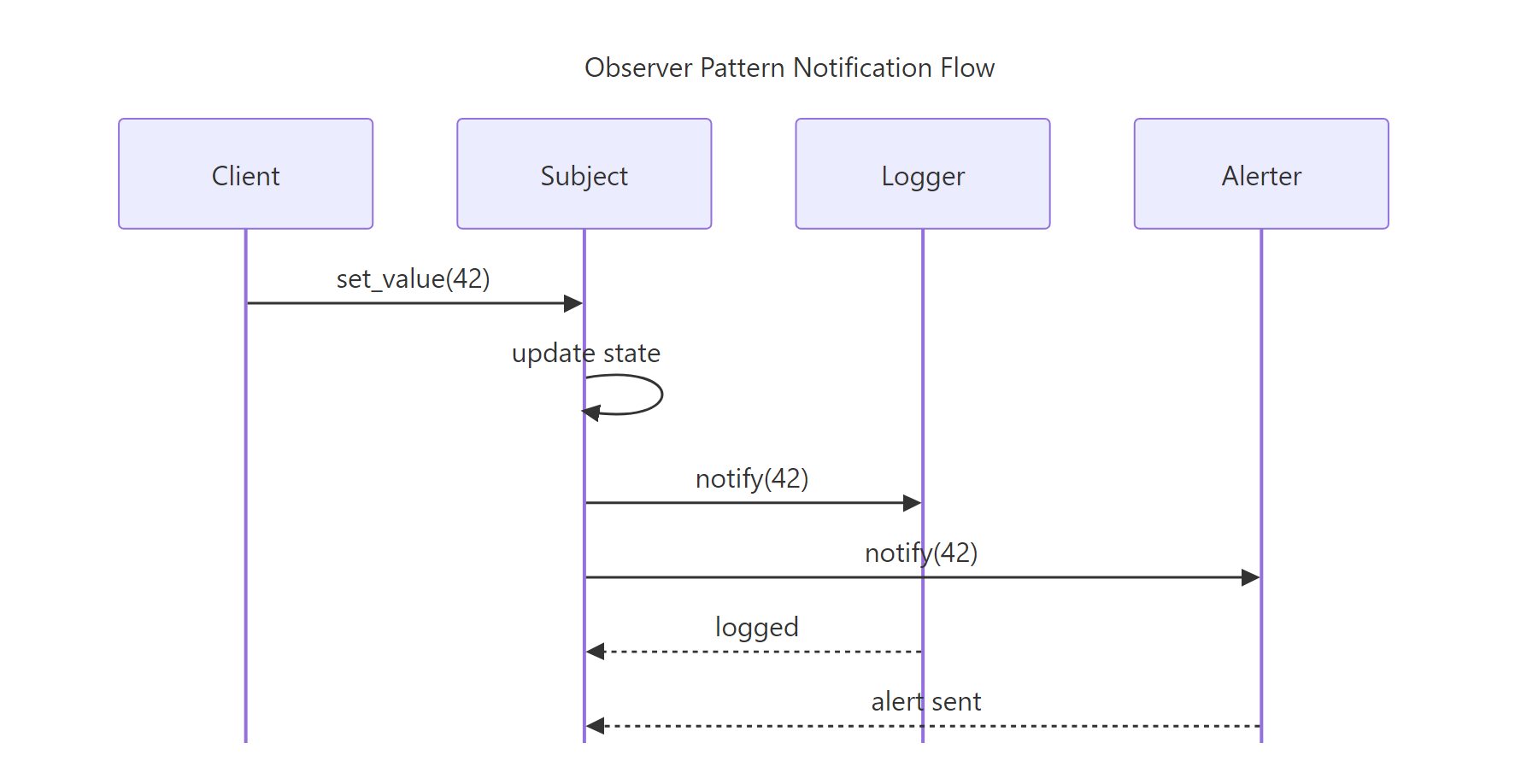
We'll model a temperature sensor as the subject and attach two observers: a logger that prints every reading, and an alerter that only fires when the value crosses a threshold.
Neither LoggerObs nor AlertObs knows the other exists, the sensor just walks its observer list and calls update() on each. Adding a third observer tomorrow is a single $subscribe() call; removing one is a single $unsubscribe().
Figure 2: The subject notifies every subscribed observer whenever its state changes.
Warning
R6 objects are reference-semantic, always mutate in place. Writing self$observers <- c(self$observers, obs) works; writing it outside the R6 method using x <- sensor; x$observers <- ... mutates the original sensor too, because x is not a copy. This is exactly why R6 fits Observer cleanly: one subject is one shared identity.
Try it: Write ex_AverageObs, an observer that keeps a running vector of readings in a public values field and prints the running mean on every update.
RExercise: running-mean observer
ex_AverageObs <-R6Class("ex_AverageObs", public =list( values =c(), update =function(x) {# your code here } ))ex_sensor <- TempSensor$new()ex_sensor$subscribe(ex_AverageObs$new())ex_sensor$set_value(10)ex_sensor$set_value(20)#> Expected: running mean 10, then running mean 15
Click to reveal solution
RRunning-mean observer solution
ex_AverageObs <-R6Class("ex_AverageObs", public =list( values =c(), update =function(x) { self$values <-c(self$values, x)cat("running mean =", mean(self$values), "\n") } ))ex_sensor <- TempSensor$new()ex_sensor$subscribe(ex_AverageObs$new())ex_sensor$set_value(10)#> running mean = 10ex_sensor$set_value(20)#> running mean = 15
Explanation: Because R6 mutates in place, appending to self$values inside update() persists across notifications. A plain-function observer would need external storage.
When should you reach for Singleton or Builder patterns?
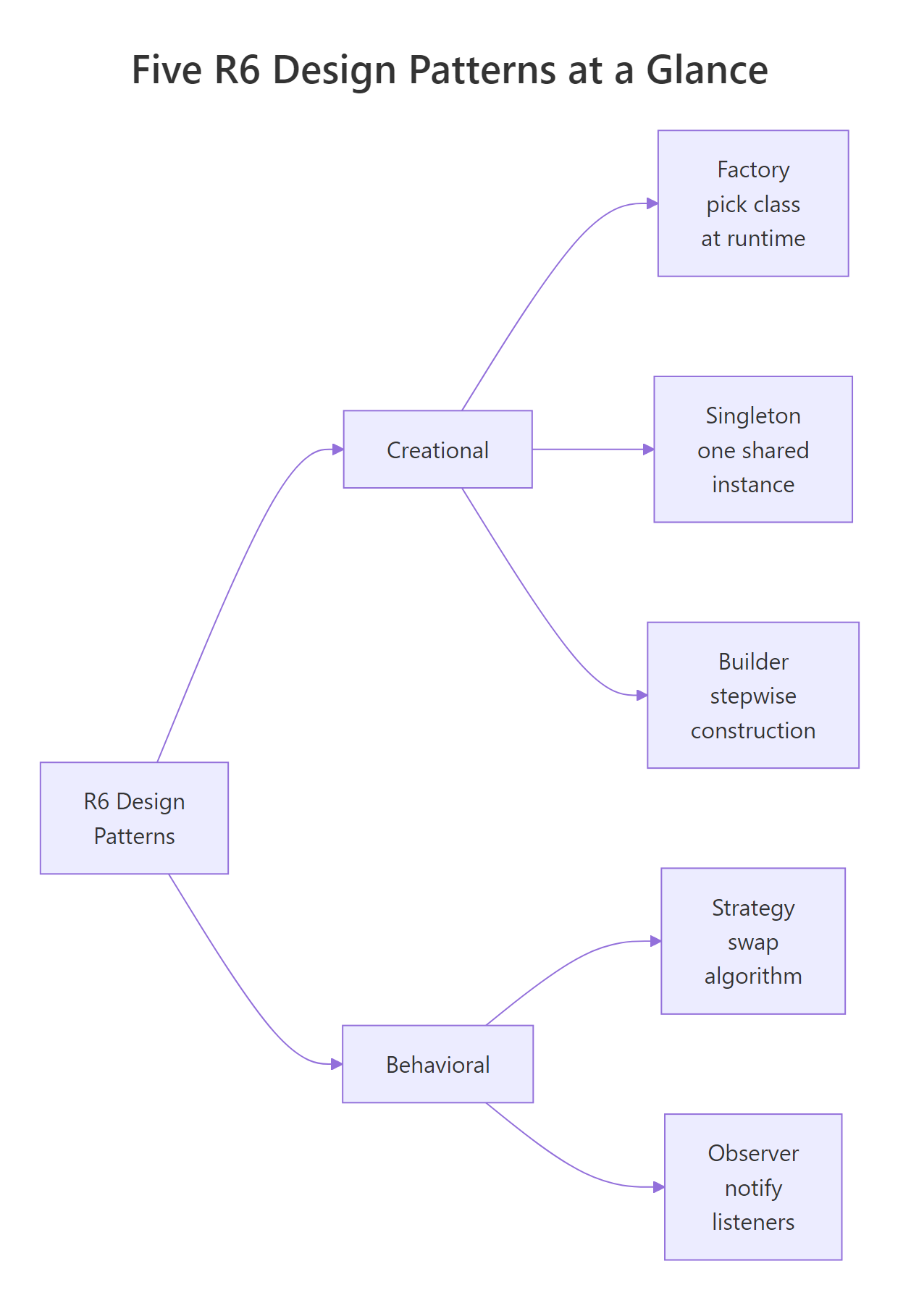
Two smaller patterns fill obvious niches. Singleton guarantees exactly one instance exists, useful for a shared configuration, a database connection, or a logger. Builder handles objects whose construction has many optional knobs and you want a fluent, readable call site.
The cleanest R singleton hides the instance inside a closure-scoped variable rather than a true class, because R packages already behave like process-wide namespaces.
cfg1 and cfg2 are the same object, setting the host through one shows up in the other.
Now Builder: a report object with many optional fields, built up with chained calls.
RReportBuilder with chained setters
ReportBuilder <-R6Class("ReportBuilder", public =list( title =NULL, author =NULL, body =NULL, format ="html", set_title =function(x) { self$title <- x; invisible(self) }, set_author =function(x) { self$author <- x; invisible(self) }, set_body =function(x) { self$body <- x; invisible(self) }, set_format =function(x) { self$format <- x; invisible(self) }, build =function() {list(title = self$title, author = self$author, body = self$body, format = self$format) } ))report <- ReportBuilder$new()$set_title("Quarterly Review")$set_author("Selva")$set_body("Revenue up 12%.")$set_format("pdf")$build()report$title#> [1] "Quarterly Review"report$format#> [1] "pdf"
Each setter returns invisible(self), which is the trick that makes the fluent $set_x()$set_y() chain work. The final $build() hands you the finished object.
Note
R package namespaces already give you a de-facto singleton. Any object stored in your package environment (via .onLoad or a top-level assignment) exists exactly once per session, no pattern required. Reach for the closure-style singleton only when you want lazy initialization or a stand-alone script.
Try it: Extend the config singleton with a set_port(p) method that updates the port. Show that changing it via one reference is visible from the other.
RExercise: add setport to Config
# Modify the Config R6Class inside get_config above to add set_port.# Then test:a <-get_config()b <-get_config()a$set_port(9090)b$port#> Expected: 9090
Explanation:a and b point at the same underlying R6 object, so any mutation on one is observable through the other.
How do you choose the right pattern for your problem?
Patterns are not a checklist. They are vocabulary, a way to name a shape that keeps turning up in your code so that you and your reviewers can discuss it without re-explaining the mechanics. The question to ask is always "what pain am I feeling?" and then pick the pattern whose intent matches.
Figure 3: The five R6 patterns grouped by purpose, creational versus behavioral.
Here is the decision shortcut I use when reviewing R code:
Symptom in your code
Reach for
A growing if/switch that picks which class to build
Factory
A growing if/switch that picks how to compute something
Strategy
State change in one place needs to trigger work elsewhere
Observer
You want exactly one shared instance of something
Singleton
Constructor has 10+ optional arguments and call sites are painful
Builder
Below is a concrete "before and after": a slope classifier that starts as a nested if/else and becomes a clean Strategy. Notice how the second version is open to new rules without editing classifier.
The v1 function grows a new else if branch every time someone invents a new rule. The v2 function will never change again, you just construct a new strategy with whatever cutoff (or entirely different logic) you need.
Key Insight
Patterns are vocabulary, not scaffolding. Don't force Strategy onto a script that has two branches and one caller. Reach for it when you catch yourself adding branches repeatedly, or when reviewers keep asking "wait, where does this behavior come from?"
Try it: Your teammate keeps adding new chart types to a monster if/else in plot_dispatch(). Which pattern fixes this, and in one sentence, why?
RExercise: pick a pattern
# Write your answer as an R comment below:# Pattern:# Reason:
Click to reveal solution
RPattern-choice solution
# Pattern: Strategy (or Factory, depending on what's branching).# Reason: The branch is deciding *how to plot*, so each chart type# becomes a strategy object exposing a common draw() method; the# dispatcher just calls strategy$draw(data) and never grows again.
Explanation: If the branching picked which class to build, Factory would fit; because it picks how to do the work, Strategy is the right name.
Practice Exercises
Exercise 1: A Strategy-based discount system
Build a Cart context and three discount strategies: NoDiscount, PercentDiscount (takes a rate like 0.1 = 10% off), and FlatDiscount (takes a fixed amount off). Cart holds items (a numeric vector of prices) and a strategy, and exposes total() which returns the discounted total. Save the final totals into my_totals as a named list.
RExercise: Strategy-based discount
# Exercise 1: Strategy-based discount system# Hint: each strategy has apply(subtotal) -> new total# Cart$total() calls self$strategy$apply(sum(self$items))# Write your code below:my_totals <-list()my_totals
Explanation:Cart doesn't know (or care) which discount math happens, it delegates to whatever strategy it currently holds. Swapping strategies is a one-line operation.
Exercise 2: Factory + Observer broadcast hub
Build a make_notifier(kind) factory that returns an EmailNotifier, SmsNotifier or SlackNotifier, each implements a send(msg) method that cat()s a tagged line. Then build an AlertHub subject that stores a list of notifiers and broadcasts every alert to all of them via $raise(msg). Save the hub to my_hub and raise one alert that reaches three notifiers.
RExercise: Factory plus Observer
# Exercise 2: Factory + Observer# Hint: the factory returns one of three R6 classes;# AlertHub$raise(msg) loops its notifiers and calls $send(msg).# Write your code below:my_hub <-NULL
Click to reveal solution
RFactory-observer solution
EmailNotifier <-R6Class("EmailNotifier", public =list(send =function(msg) cat("[email]", msg, "\n")))SmsNotifier <-R6Class("SmsNotifier", public =list(send =function(msg) cat("[sms] ", msg, "\n")))SlackNotifier <-R6Class("SlackNotifier", public =list(send =function(msg) cat("[slack]", msg, "\n")))make_notifier <-function(kind) {switch(kind,"email"= EmailNotifier$new(),"sms"= SmsNotifier$new(),"slack"= SlackNotifier$new(),stop("unknown kind: ", kind) )}AlertHub <-R6Class("AlertHub", public =list( notifiers =list(), add =function(n) { self$notifiers <-c(self$notifiers, n); invisible(self) }, raise =function(msg) {for (n in self$notifiers) n$send(msg)invisible(self) } ))my_hub <- AlertHub$new()$add(make_notifier("email"))$add(make_notifier("sms"))$add(make_notifier("slack"))my_hub$raise("disk full")#> [email] disk full#> [sms] disk full#> [slack] disk full
Explanation: The factory hides the class choice; the observer hub broadcasts one event to many listeners. Two patterns, one ten-line pipeline.
Complete Example
Here's a tiny end-to-end pipeline that uses three of the patterns together. A factory picks a reader for mtcars (we just fake one); a strategy picks the scoring method; an observer logs every result. One function, five lines of calling code, all three patterns.
The calling code never says TrimmedScore, never says LoggerObs, and never says Reader, it just says "give me a reader, score its data, and tell the sensor." Every piece is replaceable independently. That is what the patterns buy you.
Summary
Pattern
Category
Intent
Reach for it when…
Factory
Creational
Decide which class to build in one place
A branch is choosing which class to instantiate
Strategy
Behavioral
Swap algorithms at runtime
A branch is choosing how to compute something
Observer
Behavioral
Notify many listeners of one state change
State change needs fan-out without tight coupling
Singleton
Creational
Guarantee a single shared instance
You want one config/logger/connection per session
Builder
Creational
Fluent step-by-step construction
Constructor has many optional arguments
Reach for these patterns by name when a shape keeps recurring, not because the textbook told you to. R6's reference semantics make all five compact, most fit in under 25 lines.
References
Wickham, H., Advanced R, 2nd Edition. Chapter 14: R6. Link