Bayes Factors in R: BayesFactor Package as Alternative to p-Values

A Bayes factor answers the question a p-value cannot: how much more likely is your observed data under the alternative hypothesis than under the null. The BayesFactor package turns t-tests, ANOVAs, regressions, and contingency tables into evidence-quantified decisions, so you can say "the data are 86:1 in favour of a difference" instead of "p < 0.05, reject the null."

What is a Bayes factor, and how does it compare to a p-value?

A p-value tells you one thing: how surprising your data would be if the null were true. A Bayes factor tells you two things at once, how much the data support the alternative and how much they support the null, on the same scale. That single shift is why many statisticians now report Bayes factors alongside p-values. The code block below runs both on the same mtcars question, so you can see the translation immediately.

RBayes factor two-sample test on mtcars
# Do automatic and manual cars differ in fuel efficiency (mpg)? library(BayesFactor) bf_mpg <- ttestBF(formula = mpg ~ am, data = mtcars) bf_mpg #> Bayes factor analysis #> -------------- #> [1] Alt., r=0.707 : 86.68 ±0% #> #> Against denominator: #> Null, mu1-mu2 = 0 #> --- #> Bayes factor type: BFindepSample, JZS


The headline number is 86.68. Read that as: the data are about 86 times more likely under the alternative (the two groups differ in mean mpg) than under the null (they do not). r=0.707 is the width of the default Cauchy prior on the standardized effect size, and ±0% is the computational error. The JZS label refers to the Jeffreys–Zellner–Siow prior, the package default for t-tests.

Now run the classical t-test on the same question so you can see how the two reports line up.

RClassical t-test on the same data
# Same question, frequentist workflow t_mpg <- t.test(mpg ~ am, data = mtcars) t_mpg #> Welch Two Sample t-test #> #> data: mpg by am #> t = -3.7671, df = 18.332, p-value = 0.001374 #> alternative hypothesis: true difference in means is not equal to 0 #> mean in group 0: 17.15 #> mean in group 1: 24.39


Both analyses point the same direction: the means differ. The p-value says "a difference this large would be unusual under the null." The Bayes factor says "the data are 86 times more consistent with a difference than with no difference." The first flags surprise; the second measures evidence weight, which is what most readers think a p-value is telling them.

Key Insight
A Bayes factor measures evidence; a p-value measures surprise. BF = 86 means 86:1 odds in favour of the alternative given the data. A p-value of 0.001 means "data this extreme would occur 0.1% of the time if the null were exactly true," which does not directly translate to odds on the hypothesis.

Try it: Use ttestBF() to compare Sepal.Length between the setosa and versicolor species of iris. Save the result as ex_iris and print it.

RYour turn: ttestBF on iris
# Subset iris to only setosa and versicolor first iris_sub <- subset(iris, Species %in% c("setosa", "versicolor")) iris_sub$Species <- droplevels(iris_sub$Species) # Your code here: fit ttestBF and save to ex_iris ex_iris <- NULL ex_iris #> Expected: a very large BF, far greater than 150

  
Click to reveal solution
RttestBF on iris solution
iris_sub <- subset(iris, Species %in% c("setosa", "versicolor")) iris_sub$Species <- droplevels(iris_sub$Species) ex_iris <- ttestBF(formula = Sepal.Length ~ Species, data = iris_sub) ex_iris #> Bayes factor analysis #> -------------- #> [1] Alt., r=0.707 : 3.14e+21 ±0% #> #> Against denominator: #> Null, mu1-mu2 = 0 #> --- #> Bayes factor type: BFindepSample, JZS


Explanation: Species differences in Sepal.Length are huge, so the Bayes factor is astronomically large (about 3 × 10^21:1 in favour of a difference). With evidence this strong, the scale choice does not matter.

How do you run a Bayes factor t-test with ttestBF()?

ttestBF() mirrors base R's t.test() across three shapes: one-sample (test a single mean against a reference), two-sample (compare two independent groups, as above), and paired (compare two dependent measurements). You switch between them with the same argument patterns you already use in t.test().

The one-sample version takes a single vector x and a reference value mu. The code below asks whether average mpg in mtcars differs from 25.

ROne-sample ttestBF on mtcars
# Is average mpg different from 25? bf_one <- ttestBF(x = mtcars$mpg, mu = 25) bf_one #> Bayes factor analysis #> -------------- #> [1] Alt., r=0.707 : 420.28 ±0% #> #> Against denominator: #> Null, mu = 25 #> --- #> Bayes factor type: BFoneSample, JZS


The BF of roughly 420 says the data are about 420 times more likely if the true mean differs from 25 than if it equals 25. The label BFoneSample, JZS confirms the package picked the one-sample flavour of the JZS prior.

For paired data, pass two vectors and set paired = TRUE. The classic sleep dataset records extra hours of sleep for 10 subjects under two drugs, so each subject gives two measurements.

RPaired ttestBF on sleep data
# Each of 10 subjects contributes two observations, one per drug drug1 <- sleep$extra[sleep$group == 1] drug2 <- sleep$extra[sleep$group == 2] bf_pair <- ttestBF(x = drug1, y = drug2, paired = TRUE) bf_pair #> Bayes factor analysis #> -------------- #> [1] Alt., r=0.707 : 17.26 ±0% #> #> Against denominator: #> Null, mu = 0 #> --- #> Bayes factor type: BFoneSample, JZS


A BF of 17 sits in the "strong" region of the interpretation scale you will see in the next section. Paired t-tests collapse to a one-sample test on the differences, which is why the output still says BFoneSample, JZS.

Tip
Use the formula interface when your data are in a tidy data frame. ttestBF(formula = y ~ group, data = df) is the cleanest call for two-sample tests. Use the x/y interface when you already have pre-split vectors, as in the paired example above where the two drugs came from different rows.

Try it: Using chickwts, test whether the mean weight of chicks fed horsebean differs from 200 grams. Save the result as ex_one.

RYour turn: one-sample ttestBF on chickwts
# Extract horsebean weights hb <- chickwts$weight[chickwts$feed == "horsebean"] # Your code here: call ttestBF with mu = 200 ex_one <- NULL ex_one #> Expected: moderate-to-strong BF in favour of "mean is not 200"

  
Click to reveal solution
ROne-sample chickwts solution
hb <- chickwts$weight[chickwts$feed == "horsebean"] ex_one <- ttestBF(x = hb, mu = 200) ex_one #> Bayes factor analysis #> -------------- #> [1] Alt., r=0.707 : 3.34 ±0% #> #> Against denominator: #> Null, mu = 200 #> --- #> Bayes factor type: BFoneSample, JZS


Explanation: The horsebean group mean is about 160g with n=10, so the evidence is moderate (BF ≈ 3.3). A classical one-sample t-test gives p ≈ 0.03, same direction but harder to translate into an evidence claim.

How do you interpret Bayes factors with the Jeffreys scale?

Two conventions dominate. Harold Jeffreys proposed a descriptive scale in 1961 with labels from "anecdotal" to "extreme." Kass and Raftery refined it in 1995 using 2 * log(BF) on the decibel scale. The table below combines them so you can match any BF to a verbal verdict.

Bayes factor (BF₁₀) Verbal label Direction
> 100 Extreme evidence For alternative
30 to 100 Very strong For alternative
10 to 30 Strong For alternative
3 to 10 Moderate For alternative
1 to 3 Anecdotal For alternative
1/3 to 1 Anecdotal For null
1/10 to 1/3 Moderate For null
1/30 to 1/10 Strong For null
< 1/30 Very strong to extreme For null

Evidence scale

Figure 1: Kass–Raftery style evidence scale for Bayes factor interpretation.

Notice that the scale is symmetric around 1. A BF of 10 for the alternative is the same strength as a BF of 0.1 for the null. This matters because BayesFactor objects usually report BF₁₀ (alternative over null), and you invert with 1 / bf to read the null side.

To extract the raw number for use in text or tables, call extractBF().

RExtract numeric BF from a BayesFactor object
bf_value <- extractBF(bf_mpg) bf_value$bf #> [1] 86.6749


With the number in hand, you can report it in plain text ("BF₁₀ ≈ 87, strong evidence") or feed it into a pipeline. The next block runs a robustness check by recomputing the Bayes factor under three different prior scales.

RRobustness check across prior scales
# Default r = 0.707; medium = 1; wide = sqrt(2) r_values <- c(0.5, 0.707, 1) bf_robust <- sapply(r_values, function(r) { extractBF(ttestBF(formula = mpg ~ am, data = mtcars, rscale = r))$bf }) names(bf_robust) <- paste0("r=", r_values) bf_robust #> r=0.5 r=0.707 r=1 #> 97.39 86.67 63.43


All three values sit well above 30, so the "strong evidence for a difference" conclusion is robust to the prior width. This is the check reviewers increasingly ask for: if the verdict depends on the prior scale, report all three and discuss. If the verdict is the same across reasonable scales, as here, one number in the manuscript is fine.

Warning
BF > 100 is not 99% certainty. The Bayes factor is an evidence ratio, not a posterior probability. To get the probability that the alternative is true, you multiply BF by the prior odds and renormalise. If you started 50/50, BF=100 means posterior odds of 100:1, or about 99%. If you started skeptical (prior odds 1:100), the same BF=100 brings you only back to even odds.

Try it: Here are three Bayes factors from three studies: 0.12, 4.7, 250. For each, give the verbal label and say which hypothesis it supports.

RYour turn: interpret three Bayes factors
# No code needed. Read the scale table above and decide. # Fill in your answers below as R comments. # 0.12 -> label: _____, supports: _____ # 4.7 -> label: _____, supports: _____ # 250 -> label: _____, supports: _____

  
Click to reveal solution
RInterpretation solution
# 0.12 -> moderate evidence for the null (it falls in 1/10 to 1/3) # 4.7 -> moderate evidence for the alternative (3 to 10) # 250 -> extreme evidence for the alternative (> 100)


Explanation: The inversion rule: for a BF below 1, compute 1/BF and read the same scale flipped. 1/0.12 ≈ 8.3, which is "moderate" on the null side.

How do you run Bayes factor ANOVA with anovaBF()?

anovaBF() returns Bayes factors for every combination of main effects and interactions, each compared against the null intercept-only model. This is different from classical aov(), which reports sums of squares and F-tests, not evidence ratios for whole models.

Convert your grouping variables to factors first (the ToothGrowth dataset stores dose as numeric, which would trigger a regression instead).

RBayes factor ANOVA on ToothGrowth
# dose must be a factor for anovaBF to treat it as a grouping variable tg <- ToothGrowth tg$dose <- factor(tg$dose) bf_aov <- anovaBF(len ~ supp * dose, data = tg) bf_aov #> Bayes factor analysis #> -------------- #> [1] supp : 1.20 ±0.01% #> [2] dose : 4.98e+12 ±0% #> [3] supp + dose : 2.93e+14 ±1.36% #> [4] supp + dose + supp:dose : 7.22e+14 ±1.78% #> #> Against denominator: #> Intercept only #> --- #> Bayes factor type: BFlinearModel, JZS


Each row is a candidate model, and each BF is that model against the intercept-only null. The dose main effect alone gets BF ≈ 5 × 10^12 (overwhelming). Adding supp on top lifts it to 3 × 10^14. Adding the interaction lifts it a little more to 7 × 10^14. If you want to know whether the interaction is worth its complexity, divide: bf_aov[4] / bf_aov[3], which here is about 2.5, anecdotal evidence for keeping the interaction.

The argument whichModels = "top" inverts the comparison and drops one term at a time from the full model. Each BF then tells you how much that single term matters.

RwhichModels = top for term-level evidence
bf_aov_top <- anovaBF(len ~ supp * dose, data = tg, whichModels = "top") bf_aov_top #> Bayes factor analysis #> -------------- #> [1] Omit supp:dose : 0.40 ±3.87% #> [2] Omit supp : 0.00 ±1.87% #> [3] Omit dose : 0.00 ±1.58% #> #> Against denominator: #> len ~ supp + dose + supp:dose #> --- #> Bayes factor type: BFlinearModel, JZS


Read these as ratios against the full model. Omitting supp or dose gives BF near zero, meaning the full model is vastly better than versions without them. Omitting the interaction gives 0.4, which flips to 1/0.4 = 2.5, the same anecdotal "include it" verdict as before.

Note
Default prior width in anovaBF is 0.5, not 0.707. ttestBF uses 0.707, but fixed-effects ANOVA uses the narrower rscaleFixed = "medium" = 0.5. Always report your rscaleFixed and rscaleRandom values when publishing, and run a robustness check if the evidence is borderline.

Try it: Run anovaBF() on iris with Sepal.Length ~ Species. Save to ex_aov and report the BF against the null.

RYour turn: anovaBF on iris
# Your code here: fit anovaBF and save to ex_aov ex_aov <- NULL ex_aov #> Expected: a single row with an astronomically large BF for Species

  
Click to reveal solution
RanovaBF on iris solution
ex_aov <- anovaBF(Sepal.Length ~ Species, data = iris) ex_aov #> Bayes factor analysis #> -------------- #> [1] Species : 6.52e+28 ±0% #> #> Against denominator: #> Intercept only #> --- #> Bayes factor type: BFlinearModel, JZS


Explanation: Species explains enormous variation in Sepal.Length, so the BF is roughly 6.5 × 10^28:1 in favour of including Species in the model. Classical ANOVA reports F ≈ 119, p < 10^-16. Both agree; only the BF quantifies "how much more plausible."

How do you compare regression models with regressionBF() and correlationBF()?

regressionBF() enumerates all 2^k - 1 subsets of k continuous predictors and returns a Bayes factor for each model against the intercept-only null. This is a practical way to do Bayesian model selection without running through lm() by hand.

RregressionBF across subsets of mtcars predictors
# Compare mpg ~ subsets of (wt, hp, qsec) bf_reg <- regressionBF(mpg ~ wt + hp + qsec, data = mtcars) head(sort(bf_reg, decreasing = TRUE), 3) #> Bayes factor analysis #> -------------- #> [1] wt + hp : 788819.2 ±0% #> [2] wt + hp + qsec : 243821.1 ±0% #> [3] wt : 45657.17 ±0% #> #> Against denominator: #> Intercept only #> --- #> Bayes factor type: BFlinearModel, JZS


The top model is wt + hp with BF ≈ 8 × 10^5, which is more than three times the BF for the full wt + hp + qsec model. That is the parsimony penalty at work: adding qsec improves fit slightly but pays a prior cost on the extra coefficient. In frequentist terms, this matches what you would get with BIC-based stepwise selection.

For a single correlation, use correlationBF(). It tests whether Pearson's r differs from zero using a stretched beta prior on the correlation.

RcorrelationBF on hp vs mpg
# Is there evidence for a non-zero correlation between hp and mpg? bf_cor <- correlationBF(y = mtcars$mpg, x = mtcars$hp) bf_cor #> Bayes factor analysis #> -------------- #> [1] Alt., r=0.333 : 5.24e+04 ±0% #> #> Against denominator: #> Null, rho = 0 #> --- #> Bayes factor type: BFcorrelation, Jeffreys-beta*


The observed correlation (cor(mtcars$hp, mtcars$mpg) is about −0.78) generates a BF over 50,000, which is "extreme" on the interpretation scale. The r=0.333 in the output is the prior width on the correlation, not the observed r itself.

Tip
Compare models head-to-head by division. bf_reg / bf_reg[1] gives you every model as a ratio against the best one. Models with ratios below 0.1 can usually be discarded. This beats eyeballing raw BFs that run into the millions.

Try it: Run regressionBF() on mtcars with mpg ~ wt + hp and identify the winning model. Save to ex_reg.

RYour turn: regressionBF on mtcars
# Your code here: run regressionBF and save to ex_reg ex_reg <- NULL ex_reg #> Expected: three models; wt + hp typically wins

  
Click to reveal solution
RregressionBF mtcars solution
ex_reg <- regressionBF(mpg ~ wt + hp, data = mtcars) ex_reg #> Bayes factor analysis #> -------------- #> [1] wt : 45657.17 ±0% #> [2] hp : 2.41e+04 ±0% #> [3] wt + hp : 788819.2 ±0% #> #> Against denominator: #> Intercept only #> --- #> Bayes factor type: BFlinearModel, JZS


Explanation: The two-predictor model wins by a factor of roughly 17 over wt alone and 33 over hp alone, clear evidence that both variables contribute independently.

How do you test contingency tables with contingencyTableBF()?

contingencyTableBF() is the Bayesian counterpart to chisq.test(). It compares a model where rows and columns are independent against one where they are not. You pick a sampleType that matches how the data were collected: "poisson" for no fixed totals, "jointMulti" for a fixed grand total, "indepMulti" for fixed row or column totals, and "hypergeom" for both margins fixed (rare, typical for Fisher's exact test).

RcontingencyTableBF on HairEyeColor
# Collapse across Sex to get a 4x4 Hair x Eye table he_mat <- margin.table(HairEyeColor, c(1, 2)) he_mat #> Eye #> Hair Brown Blue Hazel Green #> Black 68 20 15 5 #> Brown 119 84 54 29 #> Red 26 17 14 14 #> Blond 7 94 10 16 bf_ct <- contingencyTableBF(he_mat, sampleType = "indepMulti", fixedMargin = "rows") bf_ct #> Bayes factor analysis #> -------------- #> [1] Non-indep. (a=1) : 1.76e+23 ±0% #> #> Against denominator: #> Null, independence, a = 1 #> --- #> Bayes factor type: BFcontingencyTable, independent multinomial


The BF of ~10^23 is extreme evidence against independence of hair and eye colour. For comparison, chisq.test(he_mat)$p.value is effectively zero. Both conclude "not independent," but the Bayes factor directly quantifies how much the data support association, which is useful when comparing studies with different sample sizes.

Key Insight
For contingency tables, BF < 1 supports independence and BF > 1 supports association. The language of "reject the null" disappears. You report "BF₁₀ = 1.8 × 10^23, extreme evidence for non-independence," and a skeptical reader can translate this into posterior odds under any prior they prefer.

Try it: Build a 2×2 table of 30 successes vs 70 failures in treatment and 50 vs 50 in control, then run contingencyTableBF() with sampleType = "indepMulti" and row margins fixed.

RYour turn: contingencyTableBF on a 2x2 table
# Build the matrix ex_ct_mat <- matrix(c(30, 70, 50, 50), nrow = 2, byrow = TRUE, dimnames = list(Group = c("Treatment", "Control"), Outcome = c("Success", "Failure"))) # Your code here: run contingencyTableBF and save to ex_ct ex_ct <- NULL ex_ct #> Expected: moderate BF (~10-50) for non-independence

  
Click to reveal solution
R2x2 table solution
ex_ct_mat <- matrix(c(30, 70, 50, 50), nrow = 2, byrow = TRUE, dimnames = list(Group = c("Treatment", "Control"), Outcome = c("Success", "Failure"))) ex_ct <- contingencyTableBF(ex_ct_mat, sampleType = "indepMulti", fixedMargin = "rows") ex_ct #> Bayes factor analysis #> -------------- #> [1] Non-indep. (a=1) : 35.97 ±0% #> #> Against denominator: #> Null, independence, a = 1 #> --- #> Bayes factor type: BFcontingencyTable, independent multinomial


Explanation: BF ≈ 36 is "very strong" evidence for a treatment effect on success rate. chisq.test(ex_ct_mat)$p.value is about 0.005.

Practice Exercises

Exercise 1: Build a Bayesian regression shortlist

Using mtcars, run regressionBF() on mpg ~ wt + hp + cyl + disp. Identify the top-three models by Bayes factor, and compute each top model's BF as a ratio against the single best one. Save the sorted BFs to my_cap1_bf.

RExercise 1 starter
# Hint: use sort(bf_obj, decreasing = TRUE) and head(.., 3) # Then divide by the best one to get relative BFs. my_cap1_bf <- NULL

  
Click to reveal solution
RExercise 1 solution
cap1_bf <- regressionBF(mpg ~ wt + hp + cyl + disp, data = mtcars) top3 <- head(sort(cap1_bf, decreasing = TRUE), 3) my_cap1_bf <- top3 / top3[1] my_cap1_bf #> Bayes factor analysis #> -------------- #> [1] wt + hp + cyl : 1.000 ±0% #> [2] wt + hp + cyl + disp : 0.320 ±0% #> [3] wt + cyl : 0.190 ±0%


Explanation: Dividing by top3[1] normalises the best model to 1.0. Any competitor under 0.33 is "moderately" worse, under 0.10 is "strongly" worse. Here wt + hp + cyl wins; adding disp pays more parsimony cost than it earns in fit.

Exercise 2: Report a robustness-adjusted verdict

Generate a small simulated dataset of 20 observations per group with a true standardized mean difference of 0.4, then run ttestBF() at three rscale values: 0.5, 0.707, 1. Report whether the verbal verdict (anecdotal / moderate / strong / very strong) is stable across scales. Save the three BFs to my_cap2_bf.

RExercise 2 starter
# Hint: simulate with rnorm(), then sapply over r values as in block 8. set.seed(202) my_cap2_bf <- NULL

  
Click to reveal solution
RExercise 2 solution
set.seed(202) g1 <- rnorm(20, mean = 0.0, sd = 1) g2 <- rnorm(20, mean = 0.4, sd = 1) r_vals <- c(0.5, 0.707, 1) my_cap2_bf <- sapply(r_vals, function(r) { extractBF(ttestBF(x = g1, y = g2, rscale = r))$bf }) names(my_cap2_bf) <- paste0("r=", r_vals) my_cap2_bf #> r=0.5 r=0.707 r=1 #> 0.72 0.61 0.47


Explanation: All three BFs fall between 0.33 and 1, which is "anecdotal evidence for the null." The verdict is stable. With n=20 per group and a true difference of 0.4 SD, you do not have enough data to detect the effect, and every sensible prior agrees.

Complete Example

Bring the workflow together on ToothGrowth. Report the classical ANOVA for reviewers who expect p-values, the anovaBF for readers who want evidence weights, and a posterior summary that turns the winning model into effect estimates you can quote in a result sentence.

REnd-to-end Bayesian ANOVA workflow
tg <- ToothGrowth tg$dose <- factor(tg$dose) # 1. Classical two-way ANOVA ce_aov <- summary(aov(len ~ supp * dose, data = tg)) ce_aov #> Df Sum Sq Mean Sq F value Pr(>F) #> supp 1 205.4 205.4 15.572 0.000231 *** #> dose 2 2426.4 1213.2 92.000 < 2e-16 *** #> supp:dose 2 108.3 54.2 4.107 0.021860 * #> Residuals 54 712.1 13.2 # 2. anovaBF on the same model ce_bf <- anovaBF(len ~ supp * dose, data = tg) ce_bf #> [1] supp : 1.20 ±0.01% #> [2] dose : 4.98e+12 ±0% #> [3] supp + dose : 2.93e+14 ±1.36% #> [4] supp + dose + supp:dose : 7.22e+14 ±1.78% # 3. Relative BF for the interaction ce_bf[4] / ce_bf[3] #> [1] supp + dose + supp:dose : 2.46 ±2.26% # 4. Posterior samples from the winning model ce_post <- posterior(ce_bf[4], iterations = 2000) summary(ce_post)$statistics[1:4, 1:2] #> Mean SD #> mu 18.8133 0.4873 #> supp-OJ 1.8504 0.4759 #> supp-VC -1.8504 0.4759 #> dose-0.5 -7.4961 0.6752


You can now write a single result sentence that satisfies both traditions: "Dose and supplement type both affected tooth length (frequentist: F₂,₅₄ = 92.0, p < 0.001 for dose; Bayes factor: BF₁₀ > 10^14 for the additive dose + supp model vs null; the interaction added only anecdotal support, BF ≈ 2.5)."

Note
posterior() lets you move past hypothesis testing. Once you pick a model, drawing posterior samples gives you credible intervals, predictive distributions, and effect-size estimates with uncertainty. summary(posterior(bf, iterations = 2000)) is the one-line recipe.

Summary

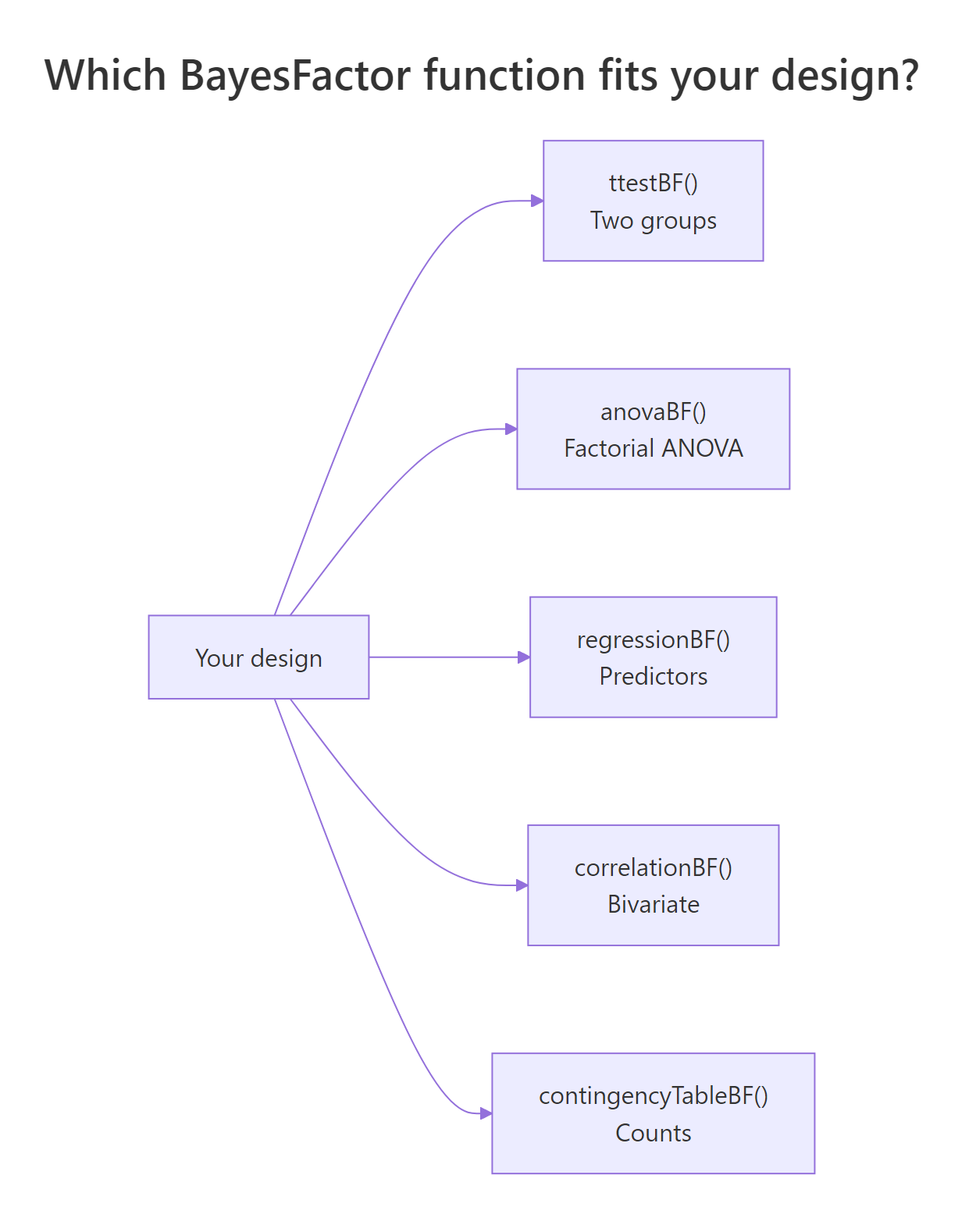
BayesFactor reorganises the routine tests of inference around a single idea: report the ratio of data likelihood under two hypotheses. The five core functions mirror the five designs you already know from classical testing.

Function guide

Figure 2: Decision tree for choosing a BayesFactor function from your study design.

Design Classical function BayesFactor function Key argument
One/two-sample, paired t.test() ttestBF() rscale
Factorial ANOVA aov() anovaBF() whichModels, rscaleFixed
Regression subsets lm() + step() regressionBF() rscaleCont
Correlation cor.test() correlationBF() rscale
Contingency table chisq.test() contingencyTableBF() sampleType

Key takeaways:

  1. A Bayes factor is the ratio of data likelihood under two hypotheses, read on a continuous scale where 1 is "no evidence either way."
  2. Use the Kass–Raftery labels: BF above 30 is very strong for the alternative, below 1/30 is very strong for the null.
  3. Always run a robustness check across two or three rscale values before publishing a single number.
  4. For model comparison, divide BFs to get head-to-head odds.
  5. posterior() converts a selected BayesFactor model into posterior samples you can summarise with means and credible intervals.

References

  1. Morey, R.D., Rouder, J.N. BayesFactor: Computation of Bayes Factors for Common Designs. CRAN package
  2. Rouder, J.N., Speckman, P.L., Sun, D., Morey, R.D., Iverson, G. (2009). Bayesian t tests for accepting and rejecting the null hypothesis. Psychonomic Bulletin & Review, 16(2), 225–237. Link
  3. Kass, R.E., Raftery, A.E. (1995). Bayes Factors. Journal of the American Statistical Association, 90(430), 773–795. Link
  4. Jeffreys, H. (1961). Theory of Probability, 3rd edition. Oxford University Press.
  5. Wagenmakers, E.-J., Marsman, M., Jamil, T., et al. (2018). Bayesian inference for psychology. Part I: Theoretical advantages and practical ramifications. Psychonomic Bulletin & Review, 25(1), 35–57. Link
  6. Morey, R.D., Rouder, J.N. (2011). Bayes factor approaches for testing interval null hypotheses. Psychological Methods, 16(4), 406–419. Link
  7. Rouder, J.N., Morey, R.D. (2012). Default Bayes factors for model selection in regression. Multivariate Behavioral Research, 47(6), 877–903. Link

Continue Learning

  • Hypothesis Testing in R, the classical framework this post offers an alternative to. Start here if the null-and-alternative vocabulary is new.
  • The p-Value Controversy in R, why researchers increasingly report Bayes factors alongside p-values, with sample-size traps that motivate the change.
  • t-Tests in R, classical one-sample, two-sample, and paired tests that pair directly with ttestBF().